General info
This service connects Salesforce with Microsoft Power Apps to automate sales workflows, build custom CRM interfaces, and extend Salesforce functionality using low-code solutions with Power Automate. Final pricing and timeline are customized after scoping.

Useful links
Related files
Related products
| Long description | This service connects Salesforce with Microsoft Power Apps to automate sales workflows, build custom CRM interfaces, and extend Salesforce functionality using low-code solutions with Power Automate. Final pricing and timeline are customized after scoping. |
| Active | 1 |

Ask an expert
Transform Salesforce with Microsoft Power Apps #
Build custom sales apps and automate CRM workflows — no coding required. #
Manual data entry in Salesforce and disconnected processes slow down sales teams and create errors.
With IT Partner’s Salesforce + Power Apps Integration, your team can:
- Create custom Salesforce interfaces for mobile or desktop users
- Automate lead routing, approvals, and data syncs with Power Automate
- Connect Salesforce with 500+ systems (ERP, SharePoint, SQL, etc.)
- Build field sales apps with offline capabilities and seamless sync
What This Integration Does #
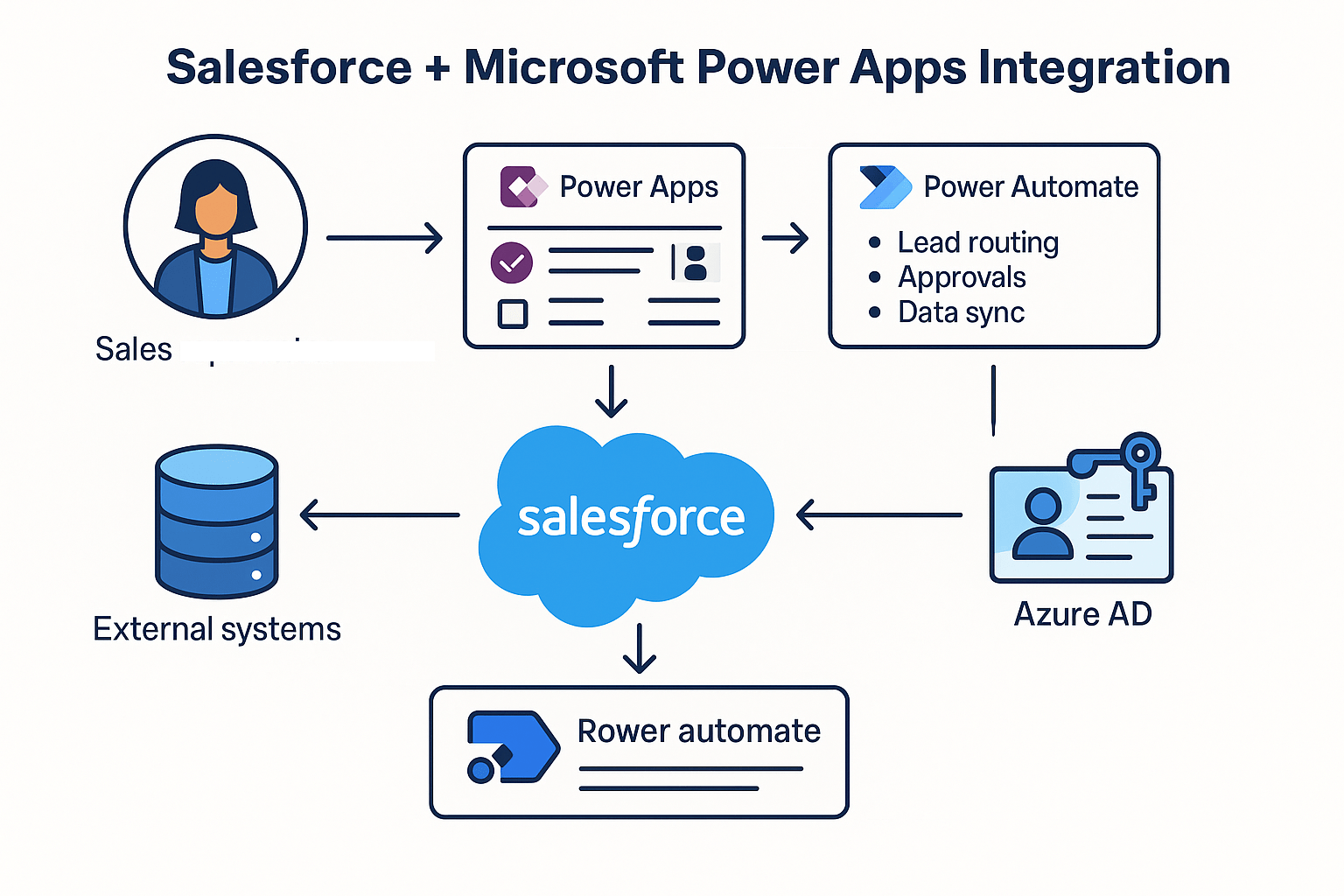
We connect Microsoft Power Apps with Salesforce using Power Automate and Salesforce REST API to:
- Design tailored UIs for Accounts, Contacts, and Opportunities
- Trigger real-time Salesforce updates from Power Apps forms
- Automate complex workflows like quote approvals or contract generation
- Secure app access with Azure AD and Salesforce permissions
- Enable offline data capture with automatic sync when reconnected
Why It Matters #
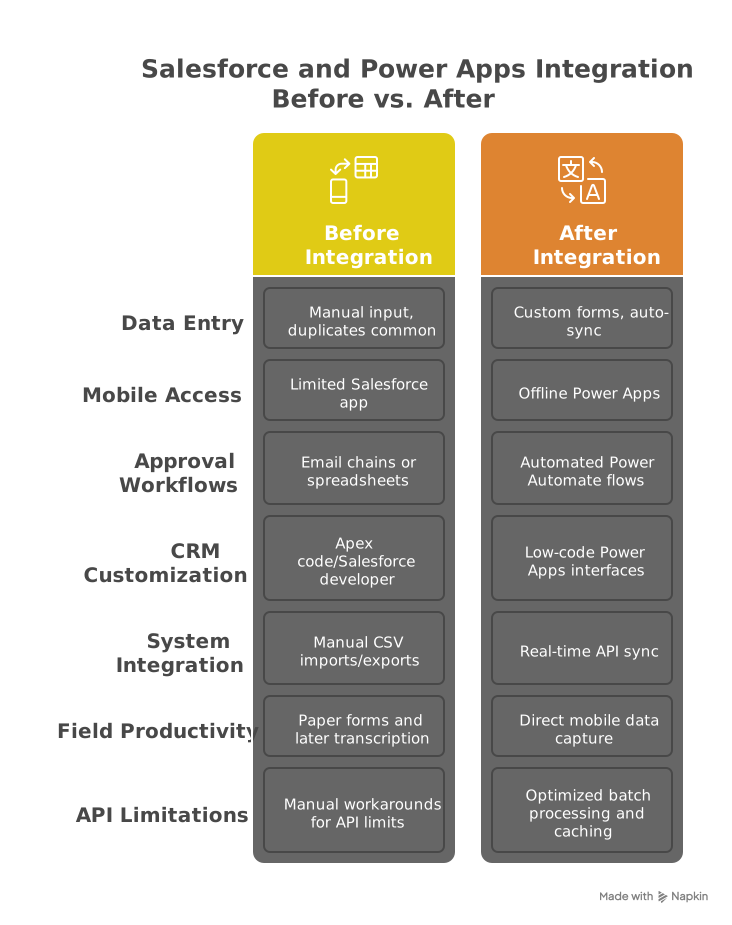
Without integration:
- Salesforce's standard UI lacks flexibility for field teams
- Manual processes create duplicate or outdated records
- Approval workflows rely on email chains and spreadsheets
With integration:
- Custom apps streamline data entry for sales reps
- Real-time sync eliminates manual updates
- Role-based access via Azure AD and Salesforce profiles
Key Benefits #
- Replace spreadsheets – Capture leads, contacts, and opportunities directly in Power Apps
- Accelerate approvals – Automate quote/contract workflows with Power Automate
- Extend Salesforce – Add custom functionality without complex Apex code
- Work offline – Field teams can enter data anytime with auto-sync later
How It Works #
- Authenticate securely using Azure AD and Salesforce OAuth 2.0
- Design Power Apps connected to Salesforce objects (Leads, Accounts, etc.)
- Build Power Automate flows to sync data, trigger approvals, or call Salesforce APIs
- Deploy mobile-ready apps with offline capability for field teams
- Monitor and optimize with built-in Power Platform analytics
Requirements:
- Salesforce Professional Edition or higher (API access required)
- Power Apps Per User or Per App license
- Power Automate Premium for complex workflows
Who's This For? #
- Sales teams needing custom mobile interfaces
- Operations teams automating quote/contract workflows
- Field service teams requiring offline access to CRM data
- IT teams extending Salesforce without complex coding

Why Choose IT Partner LLC #
- Microsoft + Salesforce certified integration experts
- Pre-built templates for common sales scenarios
- End-to-end support from design to deployment
- Proven conflict resolution for offline sync challenges

What's Next? #
Transform your Salesforce experience with custom Power Apps and automated workflows.