General info
Connect Mailchimp with Microsoft 365 tools like Outlook, Teams, To Do, and SharePoint to streamline cross-platform marketing workflows. Automate asset sharing, campaign notifications, and task management using Power Automate and Microsoft Connectors. Final pricing and timeline are customized after scoping.

Useful links
Related files
Related products
| Long description | Connect Mailchimp with Microsoft 365 tools like Outlook, Teams, To Do, and SharePoint to streamline cross-platform marketing workflows. Automate asset sharing, campaign notifications, and task management using Power Automate and Microsoft Connectors. Final pricing and timeline are customized after scoping. |
| Active | 1 |

Ask an expert
Unify Marketing Workflows with Mailchimp + Microsoft 365 Connectors #
Streamline campaign coordination and asset management across Microsoft 365. #
Switching between Mailchimp and Microsoft 365 platforms slows collaboration and increases manual work.
IT Partner’s Mailchimp + Microsoft Connectors Integration bridges these systems to enable seamless marketing workflows.
What This Integration Does #
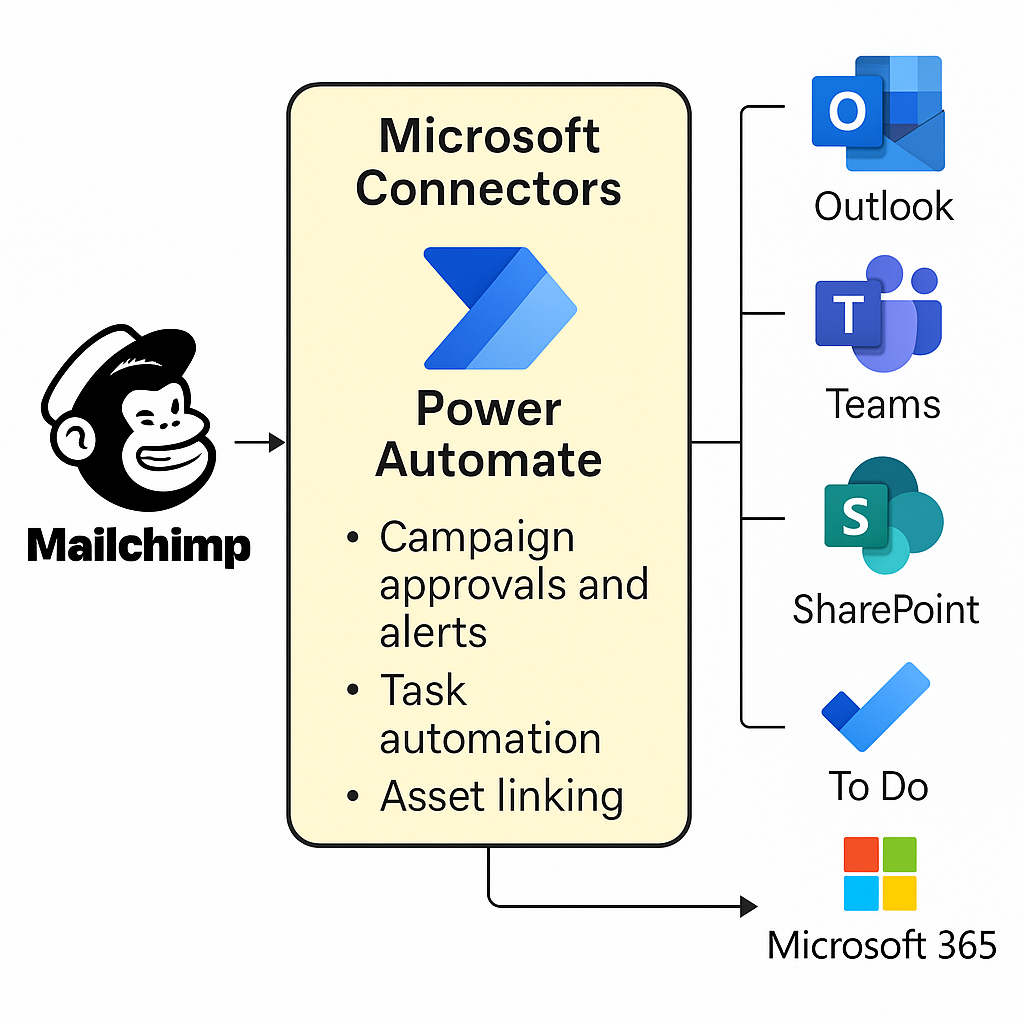
We connect Mailchimp with Microsoft 365 using Microsoft Connectors and Power Automate to enable:
- Outlook + Mailchimp Integration — Automate campaign approvals and feedback via email
- Teams + Mailchimp Messaging Integration — Send real-time campaign updates and review requests to Teams channels
- Microsoft To Do Integration — Automatically create To Do tasks from Mailchimp campaign actions
- SharePoint Asset Linking — Securely link OneDrive/SharePoint files in Mailchimp campaigns (files remain in SharePoint)
- Power Automate Integration — Trigger custom workflows from Mailchimp API events or manual submissions
Why This Matters #
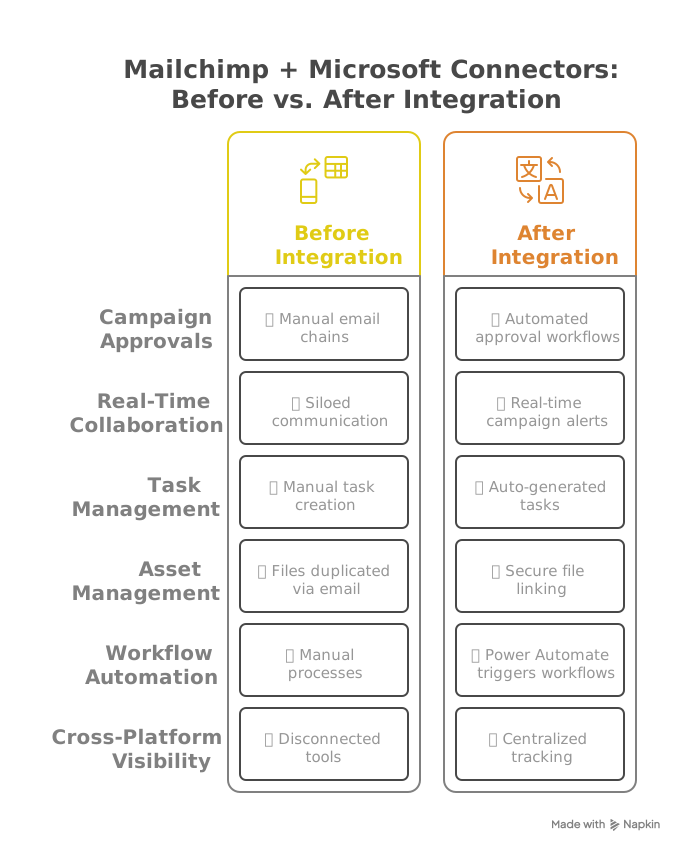
Without integration:
- Campaign approvals and feedback are trapped in siloed emails
- Manual updates create versioning issues with marketing assets
- Teams and SharePoint users miss campaign changes
With integration:
- Automated cross-platform communication between Mailchimp and Microsoft 365
- Version control via SharePoint file linking
- Streamlined campaign workflows using Microsoft’s low-code tools
Key Benefits #
- Reduce manual effort and app-switching across Microsoft 365 and Mailchimp
- Centralize campaign feedback, approvals, and tasks in familiar Microsoft tools
- Improve asset governance using SharePoint permissions and version control
- Automate reminders, task assignments, and file-sharing workflows
- Enhance team collaboration with real-time Teams and Outlook notifications
How It Works #
Our certified consultants configure Mailchimp + Microsoft Connectors using Power Automate and best practices for Microsoft 365 security.
-
Teams Integration:
- Use Power Automate and Teams connectors to send campaign alerts and review requests.
-
Outlook Integration:
- Deploy the Mailchimp Outlook Add-in for campaign reviews and approvals.
- Configure Power Automate to create Outlook tasks and approval flows.
-
To Do Integration:
- Automatically generate tasks in Microsoft To Do based on campaign milestones or manual triggers.
-
SharePoint Integration:
- Securely link files stored in SharePoint or OneDrive to Mailchimp campaigns.
- Ensure SharePoint permissions are aligned to prevent unauthorized file access.
-
Cross-platform Workflows:
- Build Power Automate flows triggered by Mailchimp API events, including campaign send, subscriber changes, or list updates.
Who’s This For? #
- Teams using Mailchimp + Microsoft 365 needing automated campaign coordination
- Marketing managers seeking faster approvals and feedback cycles
- Project and asset teams focusing on secure, centralized asset management

Why Choose IT Partner LLC #
- Microsoft Solutions Partner
- Power Automate and Mailchimp API experts
- Proven success in cross-platform marketing automation
- Agile delivery with transparent project management and user training

Ready to Connect Mailchimp to Microsoft 365? #
Let’s streamline your marketing workflows and optimize cross-platform collaboration.